How to Find New Tokens With Fomo Web Discover and Filters
Fomo Discover is a web-only token table at fomo.family/discover with six lists, 5m to 24h timeframes, filters and Quick buy from $2 to $5,000.

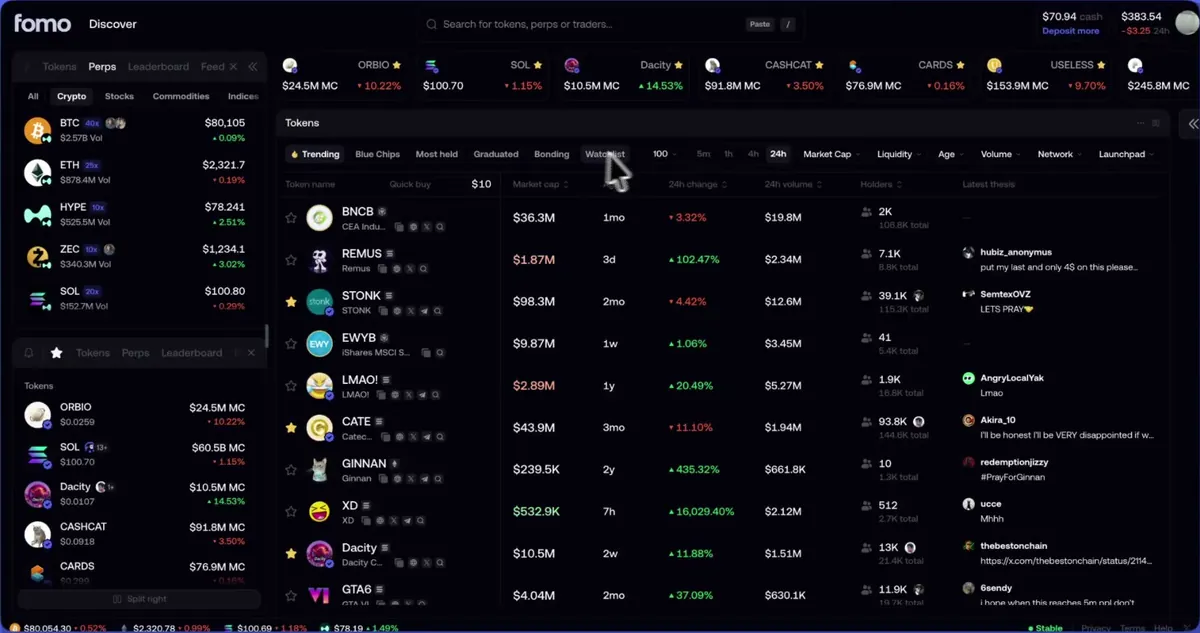
Fomo Discover is a trading screen on the web app at fomo.family/discover. Sign in, open the page, pick a list along the top of the token table (Trending, Crypto, Most held, Graduated, Bonding or Watchlist), then narrow it with the filters above the table and click any column header to sort. Discover is on the web only; the phone app has its own Tokens tab instead.
Fomo launched it on October 27, 2026, promising "built-in spam filtering to cut through the noise". The page also has Quick buy, which buys in one click without the price impact review you get on a token page. That's the main thing to keep in mind as you read on.
The six lists and what each shows
Trending is the list you land on. Every list shows Token name, Market cap, change and volume for the timeframe you pick, Holders (Fomo holders first, then the total) and Latest thesis. A few lists add a column.
| List | What's in it | Extra column | Timeframe picker |
|---|---|---|---|
| Trending | Most on-chain trading activity right now, across the market, filtered for liquidity and safety | Age, on a wide screen | Yes |
| Crypto | Blue chip tokens like BTC, ETH and SOL | Price | No, 24h figures |
| Most held | Ranked by the value Fomo traders hold in each token | None | No, 24h figures |
| Graduated | Tokens created in the last 24 hours that left the bonding curve | Age | Yes |
| Bonding | Tokens still on the bonding curve | Age and Bonding | Yes |
| Watchlist | Tokens you starred | Price | Yes |
The timeframe picker switches between 5m, 1h, 4h and 24h, and the headers change with it, so you'll read 5m change and 5m volume after you pick 5m. Trending and Most held leave out tokens flagged by Fomo's safety checks.

How the filters and thresholds work
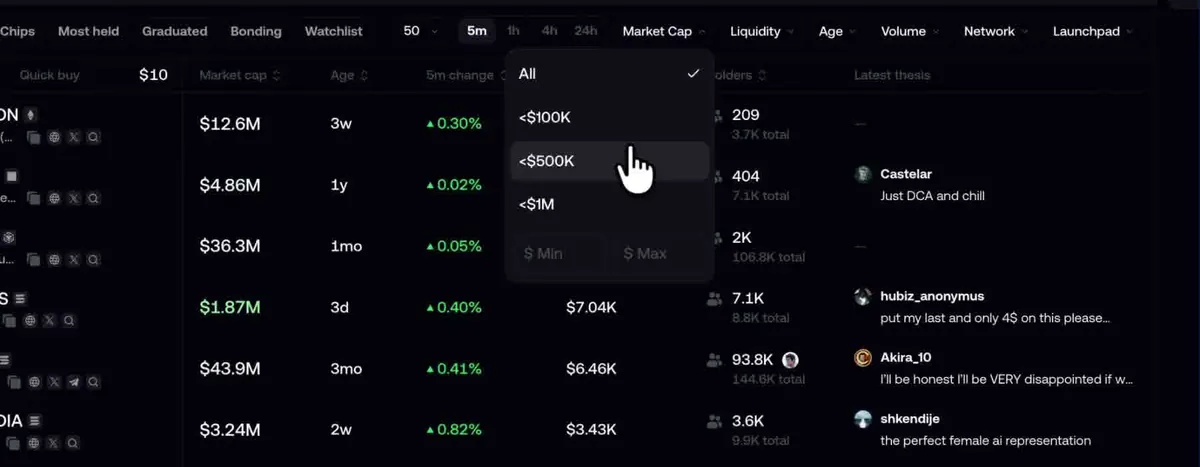
The filters sit in a row above the table. Market Cap, Volume, Network and Launchpad work on every list. Trending, Graduated and Bonding add Liquidity, Age and a row count of 25, 50 or 100. Clear all resets them.
Each filter opens a menu of presets with $ Min and $ Max boxes for your own range. In Fomo's launch video the Market Cap menu offers <$100K, <$500K and <$1M, and other shots show MC >$500K and Vol >$1M already set. Fomo described them as "custom thresholds", so set the numbers that match the size of tokens you're willing to trade.
The gear opens Advanced, with three switches: Token tax, Launchpad logo and Pair. Turn on Token tax. It puts a token's tax in orange next to its name whenever the tax is above zero, which saves you a surprise at the trade screen.
Your list, filters and column layout are remembered in that browser. Split right opens a second table beside the first with its own list and filters, so you can keep Graduated on one side and your Watchlist on the other.
Quick buy, watchlist and hidden tokens
Quick buy uses your cash balance, on whichever chain the token is on. The amount box sits in the Token name header, starts at your second buy preset, and takes anything from $2 to $5,000. Hover a row, click the Buy button that appears beside the name, and you'll see a spinner and then a green check.

If the button won't work, hover it. The tooltip tells you why: the page is still loading, no amount is set, your cash is below the amount, the amount is under that chain's minimum, or trading is off for the token. A token with a serious safety warning shows a prompt with a box to tick first.
- Star a token to pin it to the Watchlist strip at the top, with its market cap and 24h change.
- Right-click a row and choose Hide token to drop it from the table. The three dots next to Split right open Hidden tokens, where Unhide brings it back.
- Click a Latest thesis to open that token's thesis feed in a window you can move, resize or minimize.
A scanning routine that doesn't turn into overtrading
A table that refreshes all day makes it easy to click Buy twenty times. A routine keeps it in check:
- Pick one list and set your filters once, for example Graduated with a Liquidity floor and a minimum Age, or Trending with a Market Cap floor. The browser keeps them.
- Sort by Holders or 24h volume rather than 5m change, which rewards whatever spiked a minute ago.
- Star candidates instead of buying them. Come back to the Watchlist strip later and see which ones held up.
- Open the token page before you buy. That's where the price impact review and the full warning labels are, and it's where our memecoin checklist applies.
- Set the Quick buy amount to your smallest normal position, never your largest.
- Hide every token you've ruled out, so it stops catching your eye.
The honest limitation: Quick buy skips the price impact review, so on a thin pool your fill can land well away from the price in the table. Use it on tokens you've already checked. Your Discover setup also stays in the browser where you made it; filters and hidden tokens don't follow you to another browser or to the app.
Common questions
Is Discover in the Fomo app?
No, it's web only. In the app, the Tokens tab on the home screen has the same kinds of lists plus Gainers and Community. The guide to Fomo on the web covers what else differs.
Why is a token I know missing from the table?
Check Clear all, your Network filter and Hidden tokens first. Trending and Most held also skip tokens flagged by safety checks, and Graduated only covers the last 24 hours. Search by contract address still finds it.
Does a blue check in the table mean the token is safe?
It means Fomo reviewed it once. Our guide to verified tokens explains what that does and doesn't cover.
 Written by Mohammad ShahpariCrypto and SEO specialist
Did this answer your question?
Thanks for the feedback.