How to Check a Memecoin Before You Buy It on Fomo
Ten checks from Fomo's own token page, from the Unverified token note to liquidity and Top 10 holding, plus the red flags Fomo's help center lists.

Before you buy a memecoin on Fomo, open its token page and check ten things: the contract address, the blue check or Unverified token note, any warning labels, liquidity, holders and Top 10 holding, team tags, market cap, age, the theses, and which Fomo traders hold it. All of them sit on the token page, in its Holders, Feed and About tabs, or on the web token header. Going through them before every buy catches the obvious traps.
None of these checks can promise a token won't go to zero. They tell you when the odds are badly against you, and Fomo's help center adds a short list of red flags that mean you should walk away.
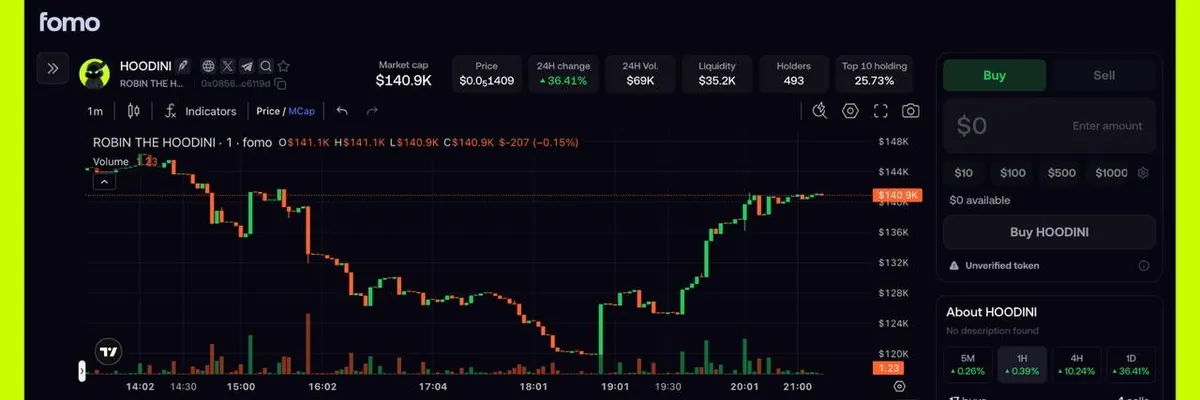
The 10-point check
- Contract address. Searching an exact ticker can bring up several tokens with the same ticker, including lookalikes. Compare the contract address on the token page with the one the project posts. Search by contract address always finds the right token.
- Blue check or Unverified token. A blue check on the logo means the Fomo team reviewed the token. An Unverified token note above Buy and Sell means nobody has. Every newly graduated token starts unverified, so this tells you how much homework is left. Our guide to verified tokens and labels explains both.
- Warning labels. Tap the warning line to read every issue. Labels such as Zero liquidity, Few holders, Low volume and High taxes each have a short explanation. On the trade screen, a Token tax row shows any fee the creator built into the contract.
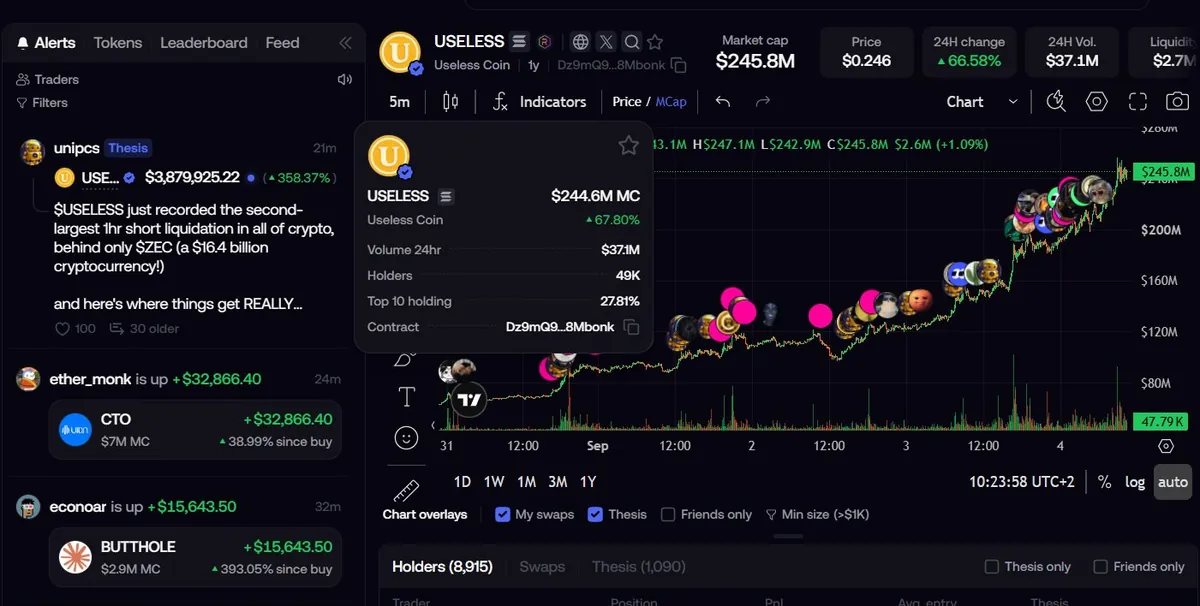
- Liquidity. Fomo shows liquidity on every token page. Very low liquidity, or liquidity that was recently removed, is a red flag. Low liquidity also means your own buy moves the price, and the quote you see before confirming reflects that price impact.
- Holders and Top 10 holding. The holder count and the Top 10 holding percentage show how spread out the supply is. If a few wallets hold a large share, the token is open to a coordinated dump.
- Team tags. In the Holders tab, a Team holdings section with Team badges means the token's team has a tagged account on Fomo and holds supply in it. No team section doesn't mean a scam, but you then have no idea which holders are the devs.
- Market cap. Fomo's market cap is the fully diluted figure: price times the total current supply. It can read higher than the circulating market cap on other sites. A tiny market cap moves fast in both directions.
- Age. The About section shows when the token was created, and on the web the age sits next to the name. Tokens on the Graduated list are under 24 hours old and can be launched by anyone, which is why that tab shows a caution banner.
- Theses. The Feed tab, or the Thesis tab on the web, shows what holders wrote about the token. Read them for facts you can check, like a team update or a new listing. A thesis is one holder's opinion, written by someone who already owns the token.
- Who on Fomo holds it. The Holders tab lists Fomo traders with their position and average entry, and the Friends switch narrows it to your friends on Fomo. On the web, chart overlays mark swaps and theses on the price chart, with Friends only and Min size filters. A lot of fresh buyers with tiny positions tells a different story from a few traders you know holding for weeks.
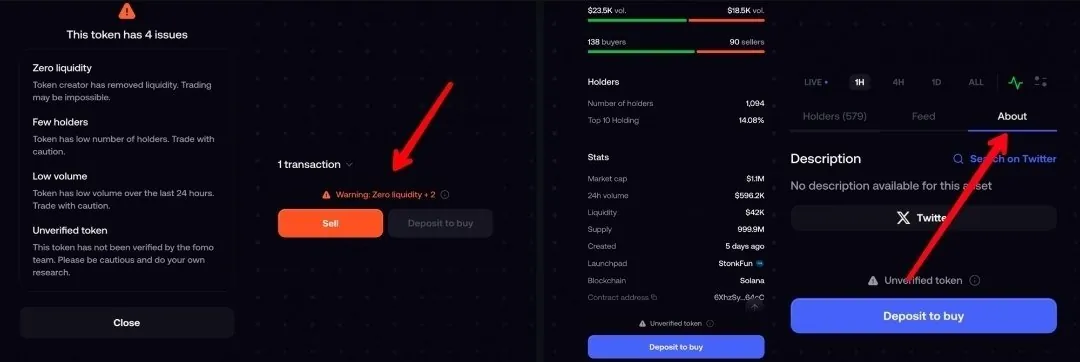
The About section also lists buyers against sellers and the volume on each side, plus the launchpad and the chain. A token where sellers far outnumber buyers is worth a second look before you add to the pile.
Red flags that mean stop
These come from Fomo's help center articles on scams and on tokens you can't sell.
| Red flag | What you see on Fomo | Why it matters |
|---|---|---|
| Liquidity pulled | Zero liquidity label, or a large value with no sell route | There is nothing left to sell into, in Fomo or any other app |
| Supply in a few wallets | High Top 10 holding | A handful of holders can dump on everyone else |
| Sells blocked | Unsellable token or Potential scam label | Contract rules can stop sales, and no platform can override them |
| Token you never bought | A new holding with a big dollar value | Airdropped scam tokens show fake values and usually can't be sold |
| Any warning label | Orange warning line on the page | Something about the contract or trading puts buyers at risk |
A token that appears in your wallet uninvited deserves its own warning: don't interact with it. The guide to random tokens in your wallet covers the one real exception.
What goes wrong after you buy
The most common surprise is a sell that won't go through. A sale can be refused with Price impact too high when the pool is thin, and a position under 2 USDC is below the minimum sell on most networks. If the liquidity was pulled after you bought, the dollar value on screen is a quote from an empty pool, and no app can turn it into cash. Our can't sell guide goes through each case.
The honest limitation: Fomo's warning labels catch a lot, but not every risky contract is flagged the moment it launches. A token can carry no warning when you buy and show Zero liquidity a day later. Spot trades on Fomo also have no stop loss, so size every memecoin buy as money you could lose in full. The stop loss guide lists what you can do instead.
Common questions
Does Fomo hide scam tokens from its lists?
Partly. Trending and Most held leave out tokens flagged by the safety checks, but those tokens can still be found by search or contract address. Graduated and Bonding show brand new launches.
Is a high holder count enough?
No. Check the Top 10 holding next to it. A thousand holders with most of the supply in ten wallets is still a concentrated token.
What if a label seems wrong?
Send support the contract address and the chain. Labels are corrected when the classification behind them is wrong and update when the token is rescanned.
 Written by Mohammad ShahpariCrypto and SEO specialist
Did this answer your question?
Thanks for the feedback.