
How to Turn On MFA on Fomo and Why You Should Do It Today
Turn on Fomo MFA under Settings, then Security: an authenticator app first, a passkey second. When Fomo asks for it, why there are no backup codes, fixes.

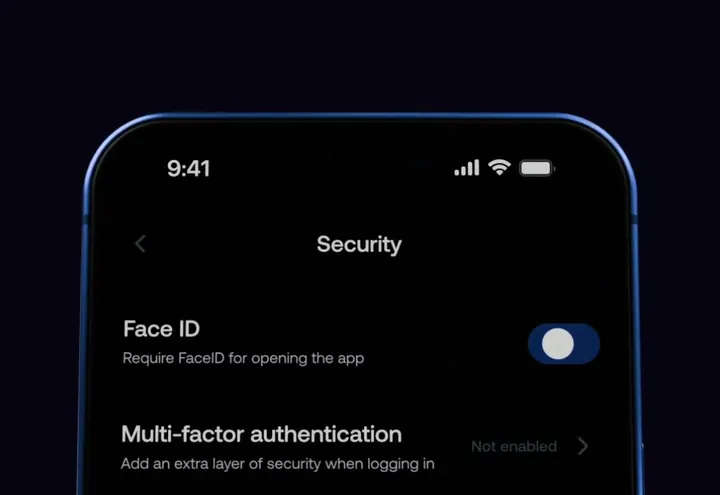
Multi-factor authentication, or MFA, adds a second check on top of your Apple or Google login. On Fomo you turn it on under Settings, then Security, then Multi-factor authentication, and set up an authenticator app first and a passkey second. From then on every withdrawal, every send and every private key export asks for it.
Fomo made MFA available to every user on September 9, 2026. It takes about three minutes. The one thing to get right is that there are no recovery codes, so the authenticator app you pick has to be one you won't lose.
Why turn on MFA today
Your Fomo account is your Apple ID or Google account. Anyone who gets into that login, or picks up your unlocked phone, can open Fomo as you. Without MFA they can withdraw your cash or export your private key in a minute. With MFA they hit a second wall: a six-digit code from an app on your phone, or your face or fingerprint through a passkey.
MFA is set on your wallet, not on one device. Turn it on in the phone app and the web app at fomo.family asks for it too, and the other way round.
How to turn on MFA on Fomo
- Install an authenticator app if you don't have one. Google Authenticator, Microsoft Authenticator, 1Password and Authy all work with six-digit codes. Pick one that backs up to your account, so a lost phone doesn't lose the codes.
- In Fomo, open the Portfolio tab, tap the gear icon, then Security, then Multi-factor authentication. On the web, open the account menu under your profile picture, then Settings, then Security.
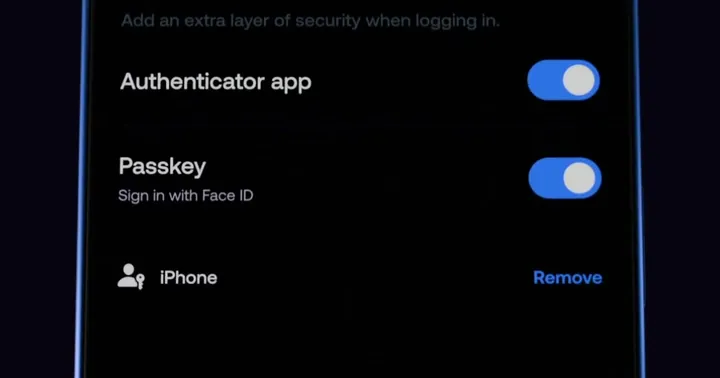
- Choose Authenticator app and follow the prompt to add Fomo to your authenticator app.
- Type the six-digit code your authenticator shows into Fomo to confirm it.
- Go back to the same screen and add a passkey if your phone supports Face ID, Touch ID or a fingerprint. A passkey lets you confirm with your face or finger instead of typing a code.
Finish the authenticator setup in one sitting. Every time the setup screen opens, Fomo creates a new entry, so a code from an earlier, abandoned attempt won't work. If you started twice, delete the old Fomo entry in your authenticator app and keep only the newest one.
When Fomo asks for MFA
- After every login
- On every withdrawal and every send to another wallet or user
- On every private key export
- Once every 24 hours when you open the app
On the lock screen you can enter a code from your authenticator app or log out. Once you've added a passkey, you can also unlock with your face or fingerprint.
MFA, Screen Lock and PIN lock: what each one does
The Security screen holds three different protections, and people mix them up.
| Setting | Where | What it protects |
|---|---|---|
| Multi-factor authentication | App and web, shared | Logins, withdrawals, sends and key export |
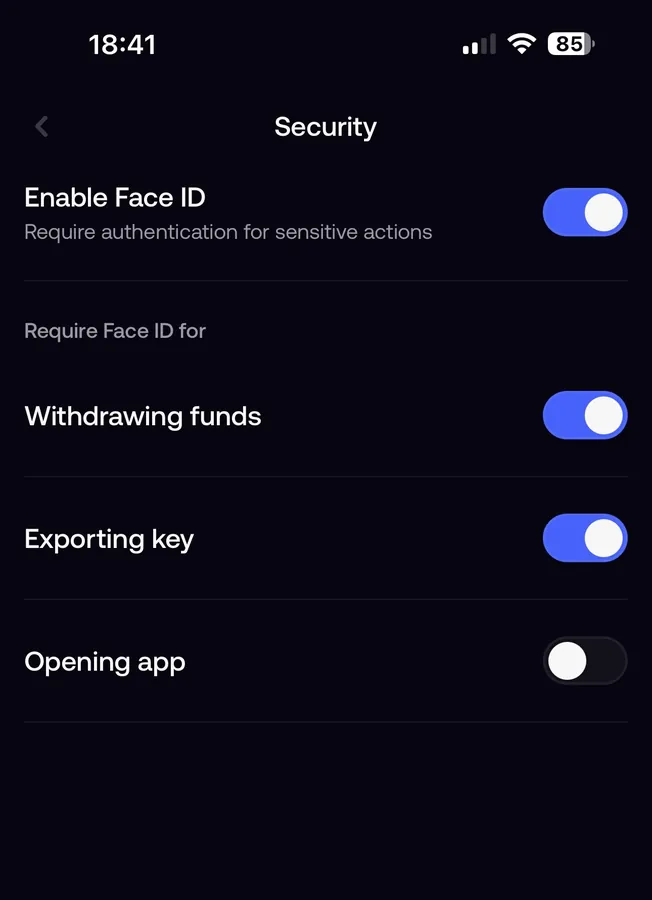
| Screen Lock | Phone app only | Opening the app on that phone, with Face ID, Touch ID or a fingerprint |
| PIN lock | Web app only | Opening fomo.family in a browser, with a six-digit PIN |
Screen Lock stops a friend who borrows your phone from opening Fomo. It does nothing against someone who has your Google password and signs in on their own phone. MFA covers that case. Turn on both.
How to keep access to your account
Fomo gives you no backup codes. If the authenticator entry disappears, you can't produce a code, and you're locked out of withdrawals until support verifies who you are. Three habits prevent that:
- Never delete the Fomo entry from your authenticator app, even when you tidy it up.
- Use an authenticator that syncs to an account or a backup, so a new phone restores it.
- Add a passkey as a second way in once the authenticator is set up.
Reinstalling Fomo doesn't remove or reset MFA, so deleting the app won't help you or an attacker.
Common MFA problems
Fomo says "Too many attempts. Try again later."
Stop entering codes. Wait a few hours, then try once with a fresh code read from your authenticator at that moment. Don't open the setup screen again in between, and don't reinstall the app; neither clears the block.
My codes are rejected
The most common cause is an old entry from an earlier setup attempt. Check that you're reading the newest Fomo entry in your authenticator. Also check that your phone's date and time are set to automatic, because the codes depend on the clock.
I can't remove the authenticator
Remove the passkey first. Fomo won't let you take the authenticator off while a passkey is still on.
I lost my phone with the authenticator on it
Contact support from the app, or from the Contact support option on the lock screen. The team will verify your identity before it helps, which takes time. The guide to contacting Fomo support lists what to send.
Next, read what to do if you can't log in to Fomo, or go back to creating a Fomo account if you haven't finished setting it up.
 Written by Mohammad ShahpariCrypto and SEO specialist
Did this answer your question?
Thanks for the feedback.


