
How to Withdraw From Fomo to Coinbase, Binance or Another Exchange
Send USDC from Fomo to Coinbase, Binance or any exchange: get the deposit address, match the network, pick Solana to save fees and avoid lost transfers.

To withdraw from Fomo to Coinbase, Binance or another exchange, get the exchange's USDC deposit address for one network Fomo supports, then in Fomo choose Withdraw, Crypto wallet, select that same network and paste the address. Solana is usually the cheapest and fastest choice if the exchange accepts USDC on Solana. The one rule that matters: the network in Fomo has to match the network of the exchange's address.
Exchanges are also the way to get money from Fomo into a bank outside the US, or into an app Fomo can't send to directly.
Step 1: Get the deposit address from your exchange
- On your exchange, open Deposit or Receive and choose USDC.
- Pick a network that Fomo also offers: Solana, Base, BNB Chain, Monad, Ethereum, Robinhood Chain, Arc or Elysium. Many large exchanges support USDC on Solana, Base and Ethereum.
- Copy the address the exchange shows for that network. If it also shows a memo or tag field, note it; most USDC deposits don't need one.
Write down which network you picked. Some exchanges default to Ethereum, which is the most expensive one to use.
Step 2: Send from Fomo
- In the Fomo app, tap the three dots next to your cash balance, then Withdraw, then Crypto wallet. On the web, Withdraw opens this screen directly.
- Enter the amount and tap Continue.
- Select the same network as the exchange address. The picker starts on Solana, so change it if your address is for another chain.
- Paste the address. Check the first and last few characters against the exchange.
- Tap Review, check the fee and network, then slide to confirm in the app, or tick the warning and tap Confirm withdraw on the web.
Fomo shows the withdrawal fee on the review screen, and it can be Free. Each network has a minimum, and an amount under it shows Amount too low.
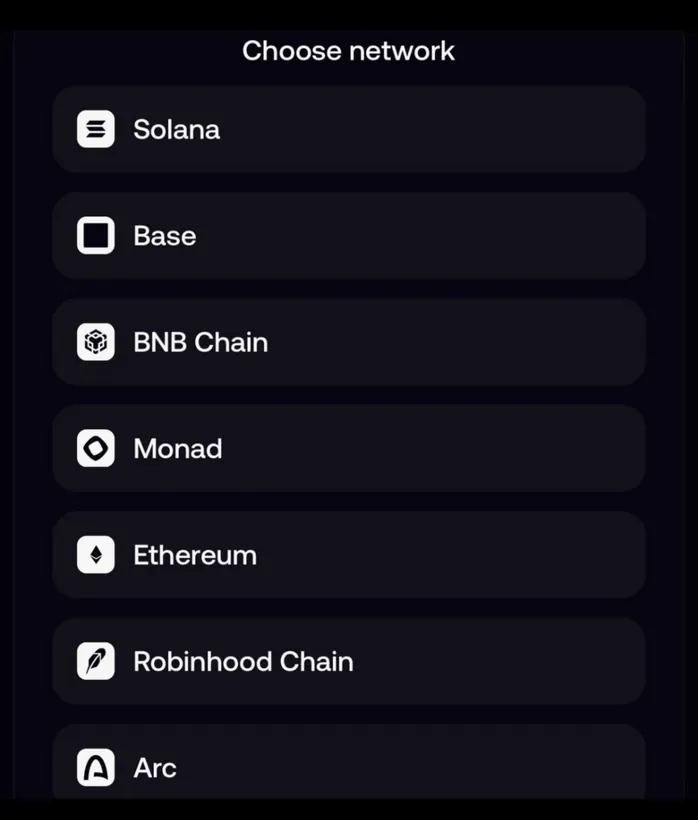
Which network to choose
| Network | Good for | Watch out for |
|---|---|---|
| Solana | Speed and the lowest network cost | The exchange must accept USDC on Solana |
| Base | Exchanges that support Base, Coinbase included | Check Base is listed for USDC on that exchange |
| Ethereum | Almost every exchange accepts it | The highest network cost; poor value for small amounts |
| BNB Chain | Exchanges that support BNB Chain | Make sure it's USDC on BNB Chain, not a different token |
| Robinhood Chain | Only exchanges that accept USDG on Robinhood Chain | You send USDG here, not USDC |
| Arc | Only exchanges that accept USDC on Arc | Many don't yet |
| Elysium | Only exchanges that accept USDC on Elysium | Few do yet |
Availability changes, so trust the network list on your exchange's deposit screen over any table, including this one.
After you send
A Solana withdrawal usually reaches the exchange within minutes. The exchange then credits it after its own number of confirmations. If it hasn't arrived after a while, find the transaction hash in Fomo's History, paste it into the block explorer for that network and confirm it reached the exchange's address. If it did, the exchange's support is the one to ask; send them the transaction hash.
Mistakes that lose money
- Network mismatch. Sending on Base to an address the exchange issued for Ethereum can leave the funds stuck or lost, depending on the exchange. Match the networks every time.
- A finance app's address. PayPal, Venmo, Robinhood and Wealthsimple crypto addresses don't take USDC on Fomo's networks. Funds sent there are lost.
- USDG to an exchange that doesn't support it. A Robinhood Chain withdrawal sends USDG. Only pick it if the exchange lists USDG on Robinhood Chain.
- Typing the address by hand. Always copy and paste, then check the ends.
Common questions
Can I withdraw tokens, not USDC, to an exchange?
Not through Withdraw. Sell the token to cash first, or export your private key and send the token from another wallet. The guide to sending tokens to another wallet covers both.
Is there a limit on how much I can withdraw?
Fomo's help center says each network has a minimum, shown in the app, and mentions no general maximum. The exchange may have its own deposit limits.
How do I then get it to my bank?
Sell the USDC on the exchange and use its bank withdrawal. In the US you can also skip the exchange and withdraw straight to your bank from the Fomo app.
 Written by Mohammad ShahpariCrypto and SEO specialist
Did this answer your question?
Thanks for the feedback.


