
What Is the Fomo Cash Balance and Why Is It in USDC?
Your Fomo cash balance is USDC on Solana and pays for trades on all eight chains. See how it works and how to fix common balance issues.

Your Fomo cash balance is the dollar amount you see at the top of the app, ready to spend on your next trade. It is USDC, a stablecoin that tracks the US dollar, and it lives in your Solana wallet. That one balance pays for tokens on all eight chains Fomo supports, so you never pick a network before you buy.
New to the app? Start with what the Fomo app is and how it works. To see where the balance shows on each screen, the tab-by-tab tour of the Fomo app covers it.
What the cash balance is
When you sign up, Fomo creates two wallets for you. One is a Solana wallet and the other is an EVM wallet, which covers Base, BNB Chain, Monad, Ethereum, Robinhood Chain, Arc and Elysium. Your cash balance is the USDC in the Solana wallet.
One USDC is designed to stay worth one US dollar. That is why the number on your Portfolio tab does not jump around like your coins do. If you have 50 dollars of cash today, you have about 50 dollars of cash tomorrow, unless you spend it.
The wallets are non-custodial. Your private keys belong to you, and Fomo staff cannot move your funds. You can export the keys from Settings if you ever want to use the wallet in another app.
Why your balance says Solana USDC on every chain
This confuses a lot of people at first. You buy a coin on Base or Robinhood Chain, and the cash that paid for it still shows as USDC on Solana. Nothing went wrong here. Fomo keeps all your spending money in one place and moves it to the right chain at the moment you trade.
Here is what happens when you tap Buy on a token from another chain. Fomo takes USDC from your Solana cash, sends the value across to the token's chain through its own bridge, and buys the token there. The token then sits in your EVM wallet. When you sell, the money comes back the same way and lands in your cash balance as Solana USDC again.
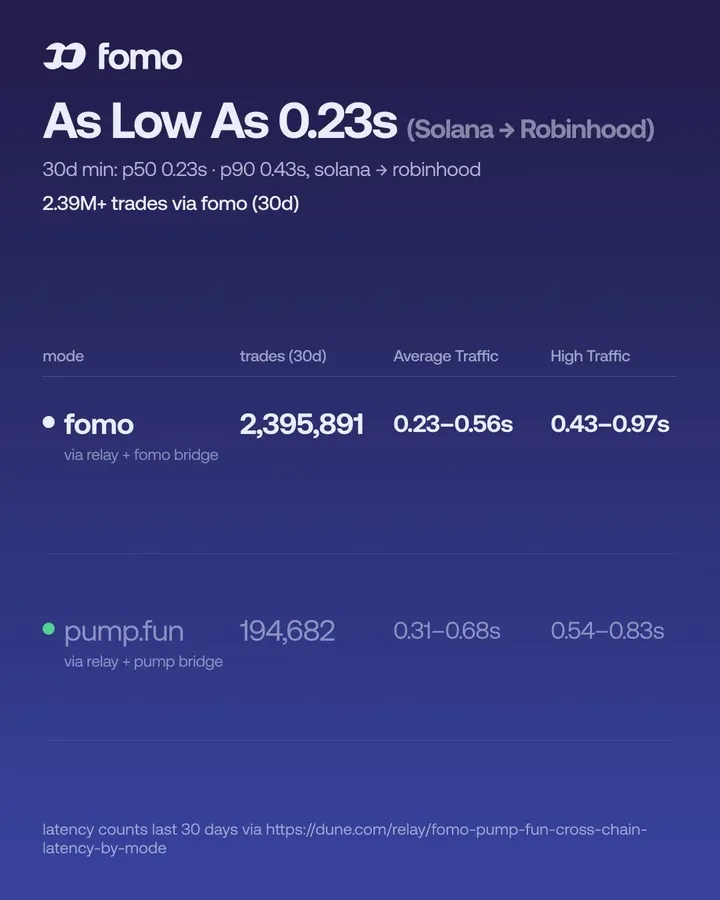
This round trip is fast. Fomo says its cross-chain trades now land in under a second in most cases, and a trade from Solana to Robinhood Chain can take less than half a second. For you, it feels like a normal buy on one network.
What you skip with one balance
On most crypto apps, a trade on a new chain means extra work. You bridge your money over and buy a little of that chain's coin to pay gas. Fomo removes all of that. You never hold ETH for Base fees or BNB for BNB Chain fees in order to trade.
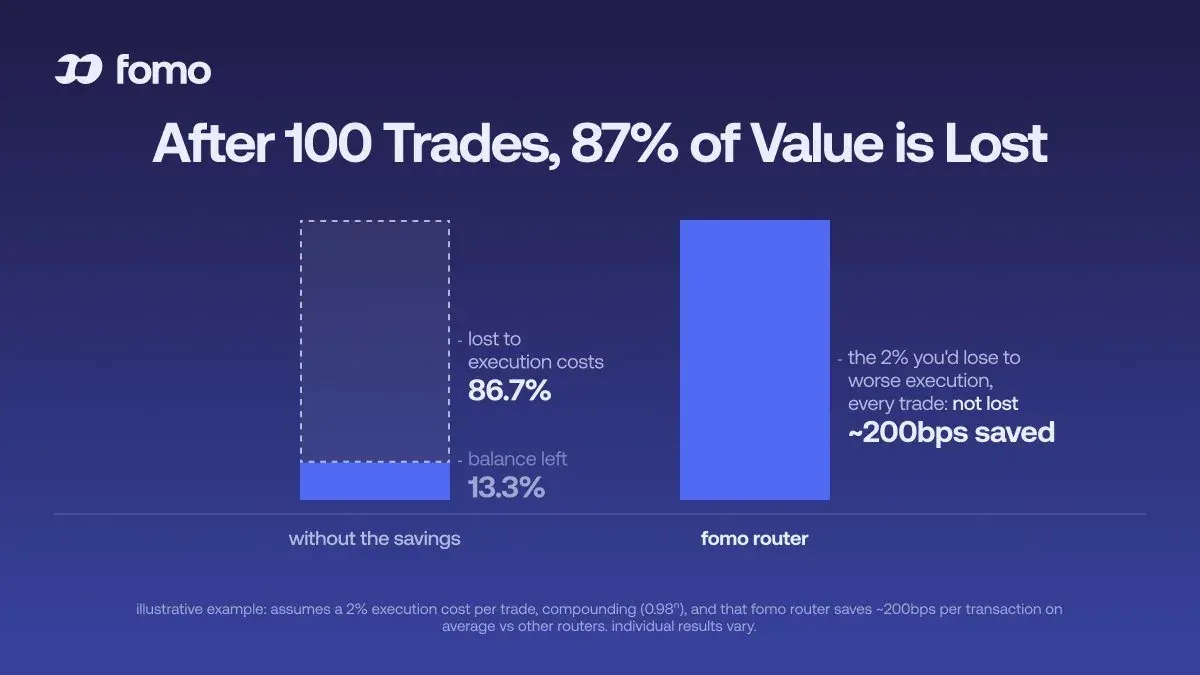
Fomo also picks the route for each trade. A better route means you get more tokens for the same money, and small savings add up over many trades.
What it costs
One balance does not mean every trade costs the same. On Solana, Fomo covers the network gas, priority fees and token rent, so you pay only Fomo's trading fee. On every other chain you pay the network fee on top of Fomo's 0.50% fee. Ethereum has the highest network costs of the eight.
Open the details on the buy or sell screen to see the Network fee row before you confirm. If the network fee is a large part of a small trade, the app shows a High network fee warning and asks you to tick I understand. A 10 dollar buy on Ethereum can lose a big share of its value to gas, so pick a bigger size or a cheaper chain for small trades. The guide to how much money you need to start works out the fees at each trade size.
How money gets into your cash balance
Tap Deposit on the Home screen or the plus sign next to your cash on the Portfolio tab. The Deposit with screen lists the methods your account can use.
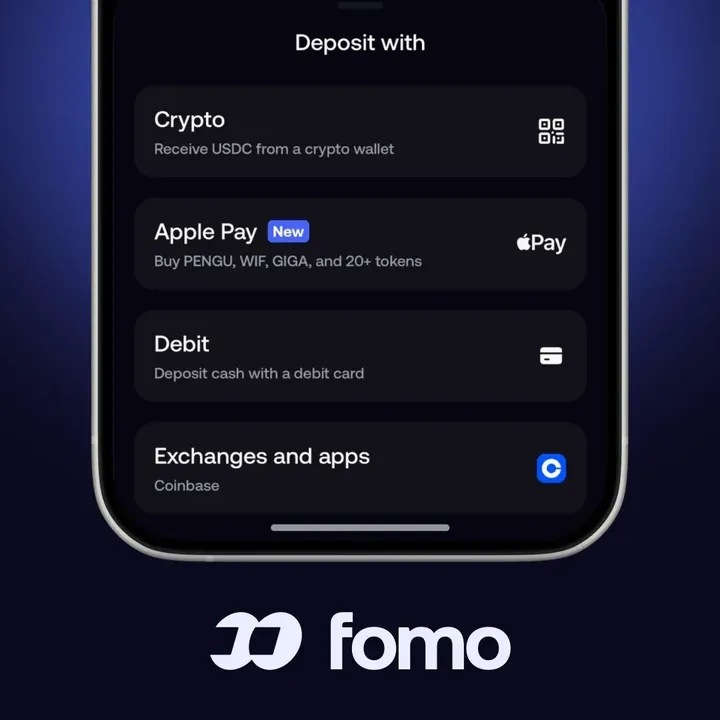
Debit and Apple Pay deposits arrive as USDC in your cash, usually within a few minutes. A bank deposit from a US account and the Exchanges and apps option also fill your cash. The web app at fomo.family offers crypto deposits only.
The Apple Pay row that says Buy before a coin name works differently. It buys that token directly, so the money goes into the coin and your cash balance stays the same.
Sending USDC from another wallet
Tap Crypto and choose the network your USDC is on. Send USDC on the same network you picked. A Solana deposit shows in your cash within seconds to a few minutes, and Solana has no minimum.
The EVM chains share one deposit address. USDC sent there lands in your EVM wallet first, then moves into your cash while you are signed in to the app, once it passes that network's minimum. Robinhood Chain uses USDG instead of USDC, with a minimum of 0.50 USDG, and it turns into Solana USDC cash on arrival.
Two mistakes come up again and again. Tokens other than USDC arrive as tokens and stay outside your cash. And funds sent on a network Fomo does not support never show in the app. If you hold SOL, ETH, BNB or MON with no USDC, a Sell tile appears on the deposit screen so you can turn that coin into cash.
Cash, holdings and your perps balance
Your cash and your coins are separate. When you buy a token, your cash goes down and your holdings go up. A coin's price moves change the holding, never the cash. The big portfolio number and the chart on your profile add up cash, holdings at today's price and your perps equity.
Perps have their own balance too. The Hyperliquid row in the crypto deposit list funds the perps account, not your spot cash. Inside perps, cross margin lets several positions share one perps cash balance, while isolated margin keeps each position's collateral apart.
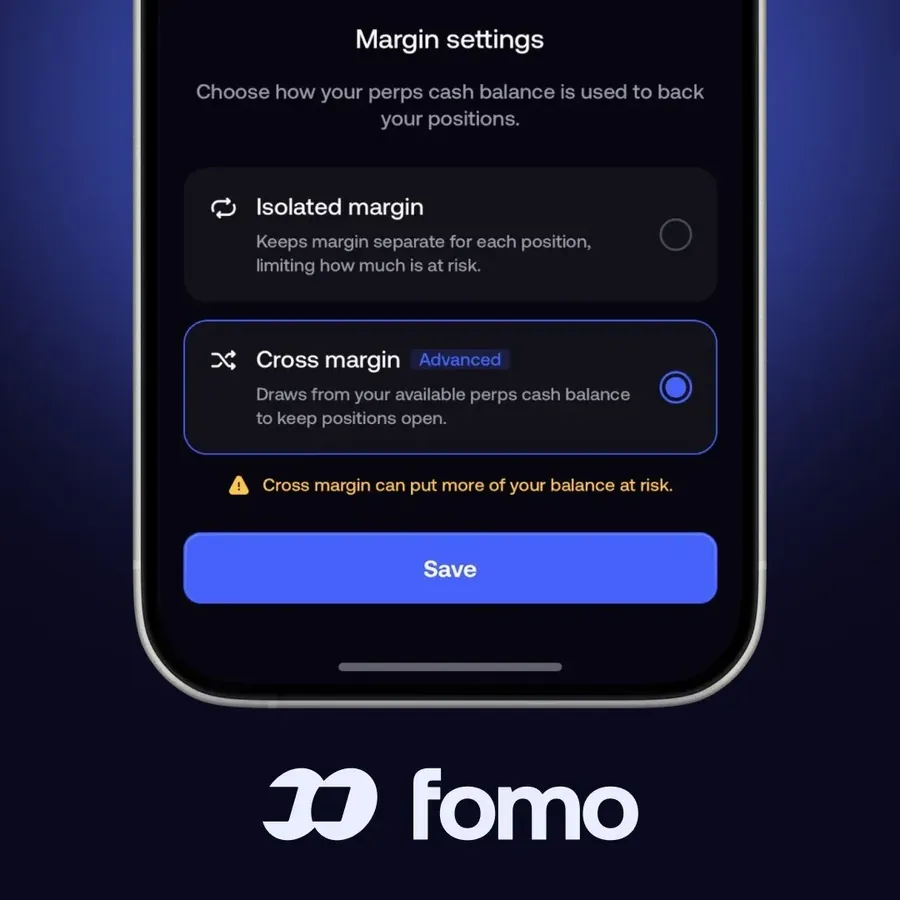
Cross margin uses your money more efficiently, but one bad trade can then eat into the margin of every other open position. Check your liquidation price before you switch.
Common cash balance problems and fixes
My balance shows stars instead of numbers
You hid your balances. In the app, tap the balance at the top of the screen. On the web, open the menu under your profile picture and turn off Blur balances. Your money stays the same either way.
My balance or positions vanished for a while
On a few busy days, a lot of people have seen their balance or some positions disappear from the screen for a time, and some could not trade because the app did not see their cash. In most cases this is a display or loading problem on Fomo's side. Your funds sit in your own wallets, so close the app fully, reopen it and give it some time. If a trade got stuck on loading, check Transaction history before you try again, so you do not buy twice.
I sold, but my cash went up by less than I expected
Some new users sell a coin worth 24 dollars on screen and see a little less arrive in cash. The amount you get depends on the price when the trade executes, which can differ from the quote on fast or thin coins. Fomo's fee, any network fee and any token tax set by the coin's creator come out too. Your realized PnL uses the price you got.
My USDC deposit is not in my cash yet
Check that you sent USDC, on the network you picked, above that network's minimum. For EVM chains, keep the app open and signed in so the funds can move from your wallet into cash. If it still does not show, open Settings, then Help and Support, or email [email protected] with the transaction hash.
 Written by Mohammad ShahpariCrypto and SEO specialist
Did this answer your question?
Thanks for the feedback.


